

Troubleshooting Index Errors
Version 8.0.0.490
INDEX
COMPATIBILITY AND PROPERTIES Querying
Compatibility Fix Results As the product is updated, or if there was an unforeseen
error during index creation, indexes may become incompatible and will throw
errors when trying to access them. The EIQ Server Configuration Tool can display
and troubleshoot index properties and fix these compatibility issues all on one
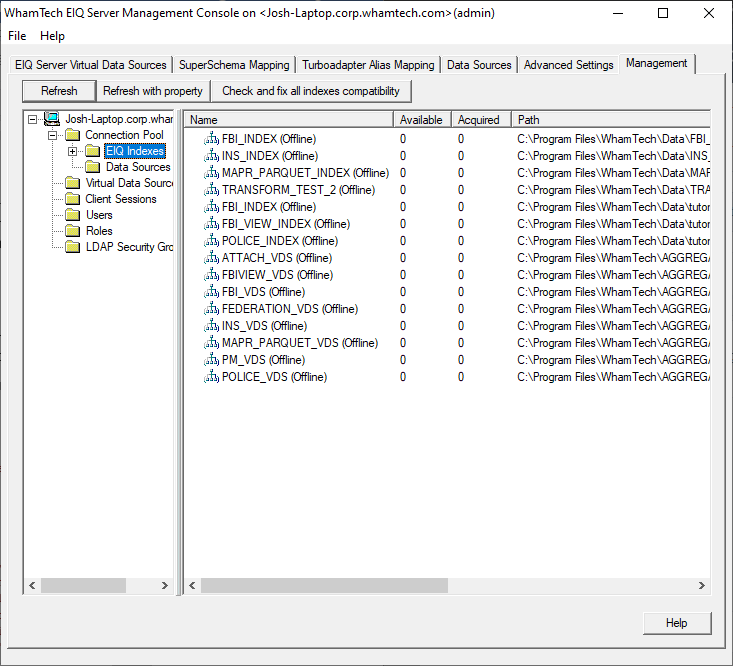
screen. The EIQ Index management panel can be found in the EIQ
Server Configuration Tool under the Management Tab, expanding the server node,
and expanding the Connection Pool folder. The UI in this window shows all of the EIQ Indexes that have
been used to create a Virtual Data Source, if it is available, if there is a
connection to it, and the physical path to the index file. With the
compatibility update, this window now shows four more elements related to
compatibility: Type - EIQ Index – displays the index to index external database like
ORACLE,SQL Server, MySQL, etc. Aggregation WorkSpace – a stored material view or any temporary result set for aggregation. NullValue - True NULL – indicates an index built with DBOPTION N. The NULL value was considered
as the least value. NULL_METADATA – indicates an index built without DBOPTION N or DBOPTION F.
The order of NULL values is dependent on the null metadata defined for each
data type (see \Common\include\ddl\ddl_defsCommon.h) which presents the problem
or sorting the records by the key. NULL_ NULL_METADATA_FIRST – indicates an index built with DBOPTION F. The NULL
value was considered as the least value. TokenMap - Off –
index or database was built without token map or the index opened with token
map off. On (Table) – index or database was built with the columnsTOKENMAP ETL#_MappedColumns
ETL#_SchemaName ETL#_TableName ETL#_ColumnName ETL#_IndexTableName
ETL#_IndexColumnName in the dbd and the token map data was stored in
ETL#_MAPPEDCOLUMNS. On (Auto) – index or database was built with TOKENMAP AUTO in the dbd. Index or DB
with a different TokenMap mode cannot be attached together. Compatibility - Compatible – means there are no compatibility issue on NullVaue or the schema of
SYS#_xxxx tables. [NullValue] – compatibility issue present. [SYS#_xxxx] – schema is not update to date. The scope of fix compatibility
through UI is limited by the NullValue and schema of SYS#_xxx tables. Before applying a compatibility fix, it is highly recommended
to make a backup of the index first. The quickest and easiest method of backing
up the index is going to the folder where the index is stored and making a copy
of the entire index; leaving the (Copy) tag or using a custom tag to keep track
of it. To restore a backup, delete the new index folder and all it’s contents
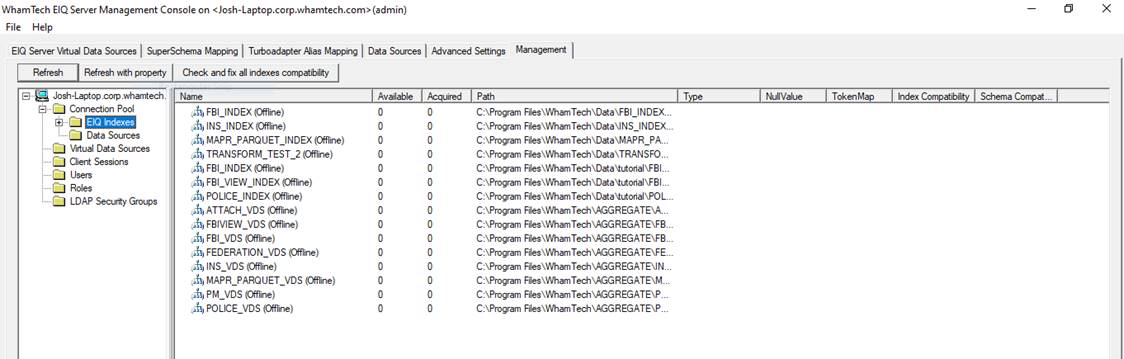
then rename the backup to the original name. After any desired backups are made, Click on the EIQ
Indexes folder under the Connection Pool tree item under the Management Tab. Click the “Refresh with
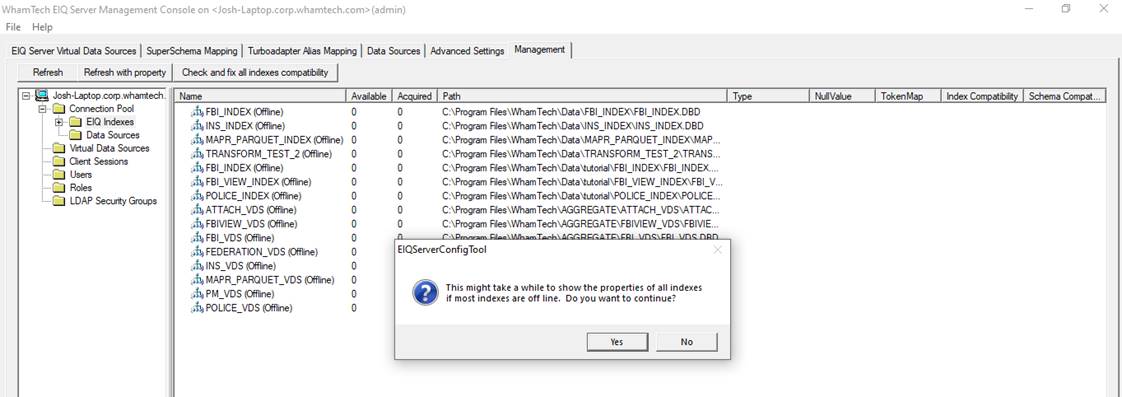
property” button to get the index properties. For performance reasons, properties are not retreived
for offline indexes by default. A pop-up display will warn
the user that the returning the property for each index may take a lot of time.
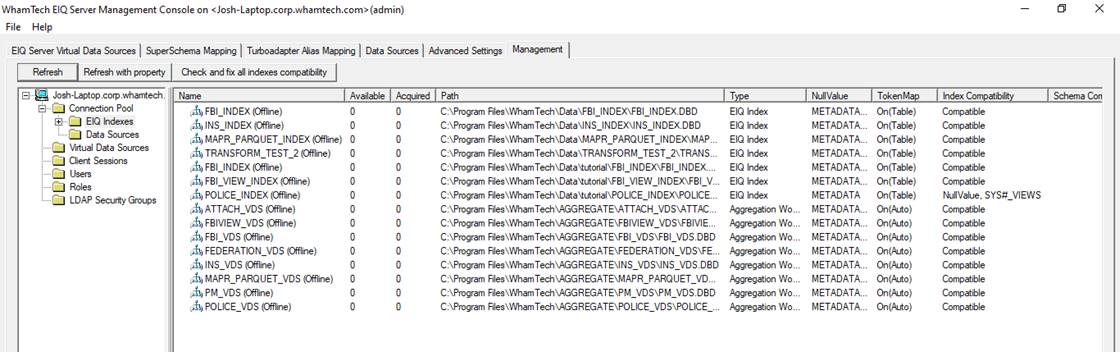
Click ‘Yes’ to continue. The EIQ index connection pool will be refreshed with
the property of each index. In the example shown above
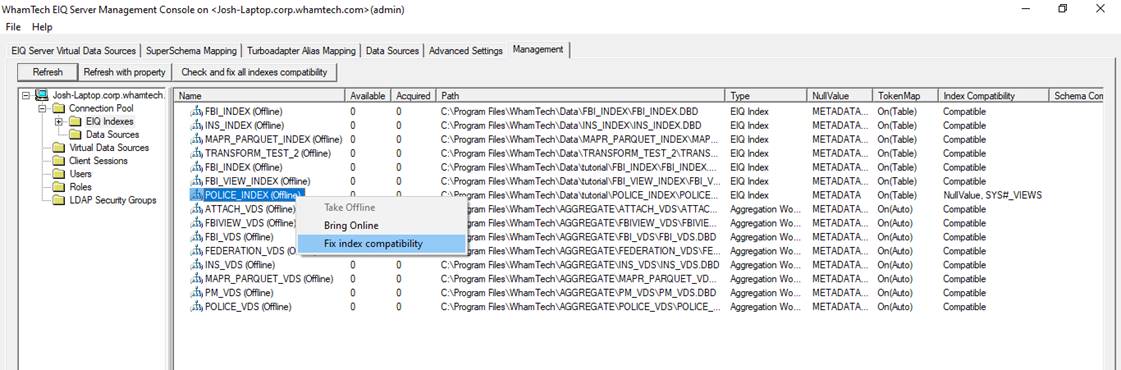
there are compatibility issues. The POLICE_INDEX located in C:\Program
Files\WhamTech\Data\tutorial has a NullValue issue and a SYS#_VIEWES schema
issue. To fix the compatibility issues, right click the index item in the list
and select ‘Fix index compatibility’ or click the “Check and fix all indexes
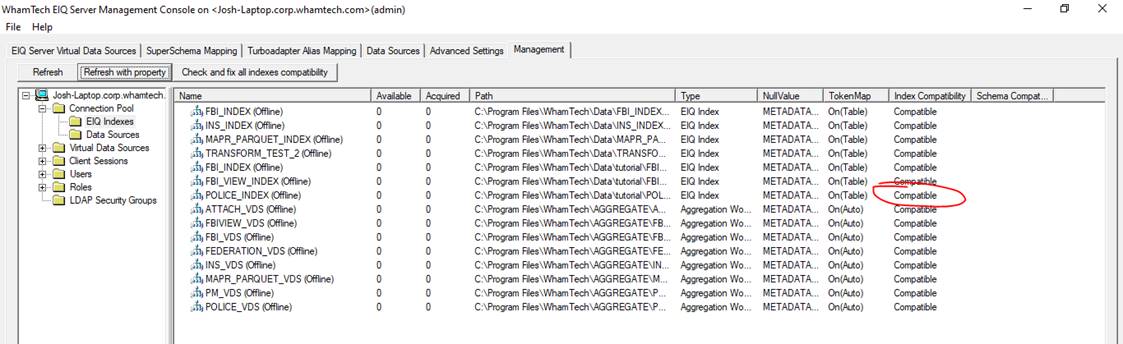
compatibility” button to fix all issues at the same time. After performing the compatibility
fix, click the “Refresh with property” button again to show the latest property to see if
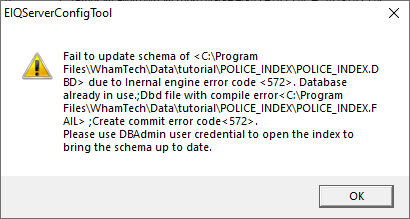
the Compatibility column updates to “Compatible”. Depending on the issues, some
compatibility fixes may fail. To fix these issues, open the
index using the EIQ Server RTI tool and either refresh the indexes or rebuild
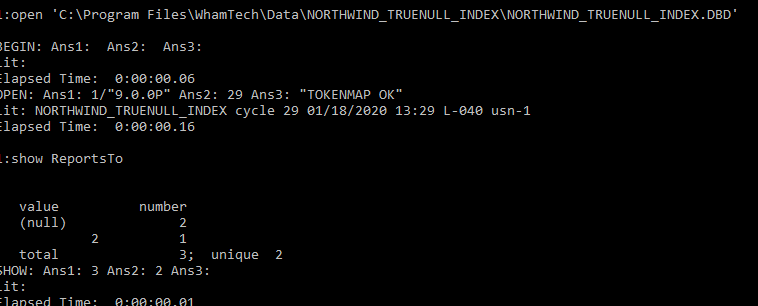
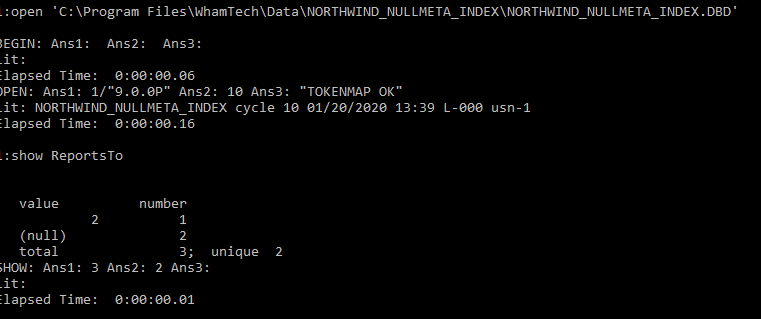
them. Query results are different on the order of (null) between TureNULL and NULLMETA using ddtl. TrueNULL – (null) always is the
first record on show command NullMeta: The (null) of ReportsTo, which is
a 4 bytes integer, appears at the end. After the fix, both should show (null) at the beginning
which means null is the least value.Index Compatibility and
Properties
Overview
EIQ Index Manager
Fixing Compatibility
Issues
Querying Compatibility Fix Results
Copyright
© 2026 , WhamTech, Inc. All rights reserved. This document is
provided for information purposes only and the contents hereof are subject to
change without notice. Names may be trademarks of their respective owners.